
| University | Massey University (MU) |
| Subject | 115.112 Accounting for Business |
115.112 Assessment 3, 2026
Please note that this assessment is due before Monday, 10 May 2026, 11pm (NZST) Assessment 3 is marked out of 100 and will contribute 20% to your final grad
Instruction
The assessment will be in two parts:
Part A: Analysing financial statements using Power BI (a Microsoft software application) and a financial discussion.
Part B: Evaluating and reporting on Iwi’s financial performance using the TDB Advisory Iwi Investment Reports
How to approach this Assessment
- Please read all instructions before starting the assessment.
- Study the relevant material in the textbook and other study materials and make sure you understand the concepts covered.
Before attempting Part A of the Assessment 3
1. Download Power BI Desktop (see the top of the following page for information about the download) OR access Power BI through Massey’s Virtual Desktop as discussed on the following page and point (3.b.) below. Only Microsoft users can download the application to their devices. If you have an Apple or other non-Microsoft device, you must access the application through Massey’s Virtual Desktop.
2. Download the following file from Stream under the Assessment 3 files folder and save it on your device:
115.112 Data Assessment 3.xlsx
3. Access the material provided for Power BI training under the Assessment Resources section:
a. Power BI Recording 1 – A quick run-through using the application
b. Power BI Recording 2 – How to access the application through Massey’s Virtual Desktop
c. Data visualisation slides – a useful resource for requirements (ii) and (iii).
4. You can attempt Part A without the training material if you have prior knowledge of the Power BI application.
Power BI Desktop Download for Microsoft users
Part A of this assessment requires you to complete tasks using Power BI Desktop (It is a free to use program). Please follow this link to download the program:
Power BI Download
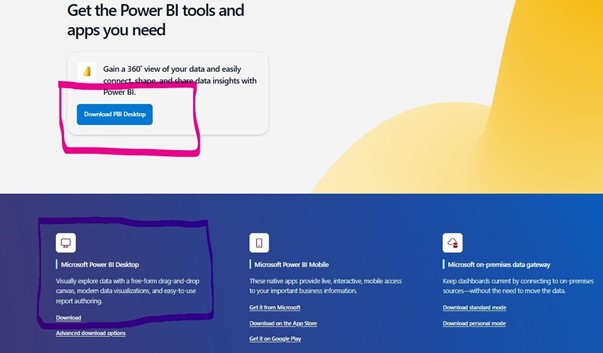
Download the ‘Microsoft Power BI Desktop’ version as highlighted below in the screenshot from the Microsoft website. Either Download link will work.
- After downloading and opening the application, you will be asked to log in. DO NOT ATTEMPT TO LOG IN USING YOUR MASSEY CREDENTIALS OR ANY OTHER CREDENTIALS. You can use the application without logging in. Opt out of logging in, by closing the dialogue box. You may need to do this a few times while using this application.
- You are now ready to upload the Excel file (see point 2 on page 2).
Power BI Desktop usage for non-Microsoft users (Apple, etc.)
If you are unable to download Power BI Desktop to your computer, you can access the program by remotely accessing Massey’s Virtual Desktop. You will find the complete instructions under the Assessment Resources section on the Stream site. The file is called:
‘Power BI Recording 2’.
Submitting the Assessment files
- The assessment will result in 2 separate files: one PDF file and one Word file.
- Submit both files in the provided submission point for Assessment 3.
- Use the following naming convention for the files that you create: use your Last Name and Student ID number as the name of the file [Do not change the file extension or you (and the marker) will not be able to use the file]. For example, if your Last Name is Smith and your Student ID number is 88888888; your files will be Smith88888888.pdf and Smith88888888.docx.
- You must submit your work in the Power BI file in an exported PDF format. See p.6 of this booklet for the instructions or the Power BI Recording 1.
- Once you have started working on an assessment, you should make backups. It pays to rename different versions of your work. A simple way to do this is to use the Save as file instruction and add a number or letter to the end of the file name. (This allows you to go back to an earlier version.)
- For policies regarding extensions and late submissions, see the Assessment section. Penalties will be applied to late submissions for which an extension has not been granted.
Assessment Brief
Part A: Financial Statements Evaluation:
You have been hired by an investment firm, Extreme Returns Ltd, as a financial analyst and your manager has asked you to analyse the financial statements of five New Zealand retail companies. Your assistant has downloaded the financial statements of the companies and extracted and summarised the data in a spreadsheet, containing the following sheets:
- 2024
- 2025
In the 2024 and 2025 sheets, there are columns for the relevant Income Statement and Balance Sheet items required for calculating the ratios.
Required:
In Power BI:
Upload the data from the provided Excel file, ‘115.112 Data Assessment 3.xlsx’. Load the ‘2024’ and ‘2025’ sheets from this file. Use the information in the data sheets in Power BI to calculate the following ratios for all the companies for 2025:
(See Appendix A for the formulas, p. 8. Use the amounts as they are provided. All amounts are presented in NZ dollars.)
(i)
- Profit Margin
- Gross Profit Percentage
- Return on Total Assets
- Return on Owners’ Equity
- Inventory Turnover
- Sales % Increase
- Number of Days in Selling Period
- Accounts Receivable Turnover (Assume all sales are on credit)
- Number of Days in Collection Period
- Current Ratio
- Quick Ratio
- Debt Ratio
- Interest Coverage
Tips:
- Use the ‘New Column’ function in the ‘Data view’ in Power BI to create a new calculated column for each of the ratios.
- Ensure you are working in the ‘2025’ sheet when calculating the ratios.
(13 marks)
(ii) Present the 2025 ratios in at least four separate tables for each of the four groupings in your Power BI file to compare the companies, in the ‘Report view’. The tables must express profitability, efficiency, liquidity and financial gearing appropriately.
(8 marks)
(iii) Create appropriate graphs in your Power BI file for the 2025 ratios to compare the companies, in the ‘Report view’. The graphs must express profitability, efficiency, liquidity and financial gearing appropriately.
(8 marks)
Exporting your tables and graphs from Power BI to a PDF file:
- Once you have completed requirements (i) to (iii) in Power BI, save the file as a .pbix file, then…
o Open the File menu at the top left of the Screen.
o Click on Export
o Click on Export to PDF
o The application will save your tables and graphs in a PDF file.
o See the naming convention for the PDF file on p. 4 of this booklet.
o This is the file you submit for assessment with your Word file.
In a Word document: [Use the same file for requirements (iv), (v), (vi), and (vii)]
Your client is interested in the Briscoe Group’s performance.
(iv) Write a discussion in terms of profitability. Include the following:
- Evaluate the Briscoe Group’s profitability by comparing the company’s 2025 results with its results for 2024. See the table below for the relevant ratios for 2024.
- Compare the Briscoe Group’s profitability with that of the other companies for 2025.
(25 marks)
(v) Write a discussion in terms of liquidity and financial gearing. Include the following:
- Evaluate the Briscoe Group’s liquidity and financial gearing by comparing the company’s 2025 results with its results for 2024. See the table below for the relevant ratios for 2024.
- Compare the Briscoe Group’s liquidity and financial gearing with that of the other companies for 2025.
(20 marks)
| Ratio | 2024 |
| Profit Margin | 14.81% |
| Gross Profit Percentage | 42.40% |
| Return on Total Assets | 18.42% |
| Return on Owner’s Equity | 37.57% |
| Sales % Increase | 0.78% |
| Current Assets | 2.14 |
| Quick Assets | 1.36 |
| Debt Ratio | 56.20% |
| Interest Coverage | 8.70 |
Part B – Accounting Information for Māori Business:
In a Word document: [Use the same file for requirements (iv), (v), (vi) and (vii)]
To answer the following question, use the TDB Advisory Iwi Investment Report for 2025 (Iwi Investment Report 2025). The TDB Advisory Reports from 2016 to 2025 (Iwi Investment Reports) can be accessed here: TDB Advisory Iwi Investment Reports
(vi) Discuss and compare the investment performance (Assets and net worth and Return on Invested Capital) of the two iwi, Ngāti Whātua Ōrākei and Ngati Porou. Include a discussion and a comparison of the asset classes each of the two iwi invested in.
(20 marks)
(vii) Provide references for (vi).
(6 marks)
Presentation of Discussion Requirements:
- Answer (iv), (v), (vi), and (vii) in the same Word file.
- Answers should be well reasoned and comprehensive.
- Your answer for (iv) should range from 400 to 500 words.
o Do not copy the tables and visualisations from (ii) and (iii) into the Word document as part of your discussion. Just refer to the ratio numbers.
o References are not - Your answer for (v) should range from 400 to 450 words.
o Do not copy the tables and visualisations from (ii) and (iii) into the Word document as part of your discussion. Just refer to the ratio numbers.
o References are not - Your answer for (vi) should range from 400 to 450 words. These do not include the references.
o Consult the provided study material and the TDB Advisory Report for 2025 for information.
o It is also advisable to add to this material from other literature, e.g. websites from the internet (e.g., the iwi’s website) and previous TDB Advisory Reports.
o References are required. Apply the APA 7th method of referencing. For a handy online, interactive tool, click here. - The discussions of (iv), (v), and (vi) do not need to be presented in the form of reports or essays.
- A good way to limit word usage is by using bullet points.
[TOTAL: 100 marks]
Appendix A: Analysis Ratios For Use With Cunningham
| TYPE OF RATIO | REFERENCE
5th ed. |
||
| PROFITABILITY | Chapter & Page | ||
| 1 | Profit Margin | Ch. 7 p.339 | Net Income x 100 Net Sales |
| 2 | Gross Profit Percentage | Ch. 7 p.339 | Gross Profit x 100 Net Sales |
| 3 | Return on Total
Assets |
Ch.8 p.397 | (Net Income + Interest Expense) x 100 Average Total Assets |
| 4 | Return on Owner’s
Equity |
Ch.8 p.398 | Net Income x 100 Average Owner’s Equity |
| 5 | Sales % Increase | Not in text | (Sales Year 2 – Sales Year 1) x 100
Sales Year 1 |
| EFFICIENCY | |||
| 6 | Inventory Turnover | Ch. 8 p.389 | Cost of Goods Sold Average Inventory |
| 7 | Number of Days in
Selling Period |
Ch. 8 p.390 | 365
Inventory Turnover |
| 8 | Accounts
Receivable Turnover ‘assume all sales are credit sales’ |
Ch. 8 p.391 | Net Credit Sales Average Accounts Receivable |
| 9 | Number of Days in
Collection Period |
Ch.8 p.391 | 365
Accounts Receivable Turnover |
| LIQUIDITY | |||
| 10 | Current Ratio | Ch. 8 p.387 | Current Assets Current Liabilities |
| 11 | Quick Ratio | Ch.8 p.388 | Quick Assets
Current Liabilities Where Quick Assets = Cash + Accounts Receivable + Short Term Marketable Securities + Short Term Notes Receivable |
| FINANCIAL GEARING | |||
| 12 | Debt Ratio | Ch. 8 p.394 | Total Liabilities x 100 Total Assets |
| 13 | Interest Coverage | Not in text | Net Income + Interest Expense Interest Expense |
Appendix B: Marking Grid
| Qualities | Fail | C Pass | B Pass | A Pass | Max Mark |
| Calculation of ratios (i) | Marks allocated to ratios calculated in Power BI.
If a substantial part of workings are correct, part marks may be awarded. |
13 | |||
| Table(s) of the ratios in (ii) | Marks allocated for the tables prepared in Power BI. The tables must appropriately express profitability, efficiency, liquidity and financial gearing. The presentation of tables will also be evaluated. | 8 | |||
| Visualisation of the ratios in (iii) | Marks allocated for the graphs prepared in Power BI. The graphs must appropriately express profitability, efficiency, liquidity and financial gearing. The presentation of graphs will also be evaluated. | 8 | |||
| Addressing requirement (iv) | Work does not address the assessment brief or the focus is very inadequate. 0-12.5 | Work makes some relevant points but is not adequately focused on the assessment brief
13-17 |
Work displays an understanding of the brief and provides a range of relevant evidence in answering it.
18-21 |
Work which engages closely with the assessment brief and addresses its implications as well as its “surface sense”
22-25 |
25
|
| Addressing requirement (v) | Work does not address the assessment brief or the focus is very inadequate. 0-10 | Work makes some relevant points but is not adequately focused on the assessment brief
11-13 |
Work displays an understanding of the brief and provides a range of relevant evidence in answering it.
14-16 |
Work which engages closely with the assessment brief and addresses its implications as well as its “surface sense”
17-20 |
20
|
| Addressing requirement (vi) | Work does not address the assessment brief or the focus is very inadequate. 0-10 | Work makes some relevant points but is not adequately focused on the assessment brief
11-13 |
Work displays an understanding of the brief and provides a range of relevant evidence in answering it.
14-16 |
Work which engages closely with the assessment brief and addresses its implications as well as its “surface sense”
17-20 |
20
|
| References (vii) | Marks given for the presence of references and accurate use of APA 7th ed. | 6 | |||
| Total | 100 | ||||
Assessment Queries
Please feel free to keep in touch with the 115.112 team regarding this assessment. That way all students benefit and often we have found that the best way of learning is through discussion with your peers as well as teaching staff.
Please note that this assessment is at individual, not group level. Discussion is fine but do not post your answers to the assessment on STREAM through discussion forums, as that will lead to penalties. If you are uncertain, please contact the teaching staff.
There are a large number of students in this paper, but that does not mean that you are not individually very important to us. We value each student and will try to provide appropriate guidance to the best of our ability.
Return of marked assessments
You will be informed when your marks are available. A break-down of the mark will be given on a marking sheet, available at the same point where you uploaded your assessment. Note that the normal turnaround of assessments is three working weeks. However, we will be working to return the assessment sooner than that.
There will be feedback in the form of suggested solutions and overall comments by the marker.
All the best with your assessment!
Order Trusted NZ Assignment Help for 115.112 Assessment 3
Hire NZ Native Experts 24/7.
If you’re having difficulty completing your 115.112 Accounting for Business Assessment 3 at Massey University, especially with Power BI analysis, ratio calculations, and financial discussions, you’re not alone. Many students turn to NZ Assignment Help for expert academic support. Our specialists provide accounting assignment help aligned with your course requirements. You can also review our massey university assignment example for better understanding. Get started today with our write my essay and receive a fully customised, human-written, plagiarism-free solution.

- CRIM 314 The History of Crime & Justice Assignment 1, 2026 | VUW
- MNSC842 Clinical Practicum 3 – Toia Mai Assessment Brief 2026 | Wintec
- BSNS5202 Advanced Business Information Assessment 1, 2026 | Open Polytechnic
- BSNS5204 Office Management Assessment 1, 2026 | Open Polytechnic
- BSNS5201 Administration Systems and Processes Assessment 1, 2026
- ENTR501 Introduction to Entrepreneurship and Innovation Assignment 2, 2026 | AUT
- ACCY6108 Accounting Information Systems Assessment 2, 2026 | Open Polytechnic
- 115764 Leadership and Teamwork Assessment 2, 2026 | Massey University
- BBIM508 Social Media Networks Assessment 1 Brief 2026 | NZSE
- ENTR613 Highway Geometric Design Assessment Brief 2026 | University Of Canterbury